


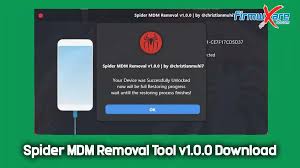
Spider MDM Removal ist ein kostenloses Windows-Tool, mit dem sich MDM-Konfigurationsprofile und MDM-Lockscreens auf iPhones und iPads entfernen lassen.
Es richtet sich vor allem an Techniker und erfahrene Nutzer, die betreute oder gesperrte Geräte wieder frei nutzbar machen möchten.[web:8]
Was ist Spider MDM Removal?
- Spezielles Windows-Programm zum Entfernen von Mobile-Device-Management-(MDM)-Profilen auf iOS-Geräten.
- Ermöglicht das Entfernen des Remote-Management-Bildschirms und das Abschließen der iOS-Ersteinrichtung.
Unterstützte Geräte & typische Nutzung
- Unterstützt Alle iPhone-Modelle und iPad-Generationen, unabhängig von der installierten iOS-Version.
- Ideal für gebrauchte Firmen- oder Schulgeräte, die nach Verkauf oder Rückgabe noch an einen MDM-Server gebunden sind.
Hauptfunktionen
- Entfernt das MDM-Konfigurationsprofil, sodass das Gerät nicht länger durch einen Administrator gesteuert wird.
- Hebt den MDM-/Remote-Management-Lockscreen auf, sodass alle Funktionen des Geräts wieder verfügbar sind.
Systemvoraussetzungen
- Nur für Windows-PCs (Laptop oder Desktop).
- USB-Kabel und installierte Apple-Treiber (z. B. über iTunes) erforderlich.
Wichtige Hinweise
- Verwende das Tool nur auf Geräten, für die du berechtigt bist (eigene Geräte oder mit ausdrücklicher Zustimmung des Eigentümers).
- Beachte, dass das Entfernen von MDM gegen Unternehmens- oder Schulrichtlinien verstoßen kann; Nutzung auf eigenes Risiko.
Download Spider MDM Removal (Windows)
Den aktuellen Download für Spider MDM Removal findest du hier:
Spider MDM Removal – Download (Windows)
Nach dem Herunterladen entpackst du die ZIP-Datei, startest das Programm als Administrator und testest es idealerweise zuerst an einem nicht produktiv genutzten Gerät.

